
Your Client Left a Google Review. So Where Is It?
An owner texted me: “Why would a Google review not show up after a client said they left one, and then she tried again when I told her I didn’t see it?”
Ugh….you do the work, the client takes the time, and the review is nowhere to be found.
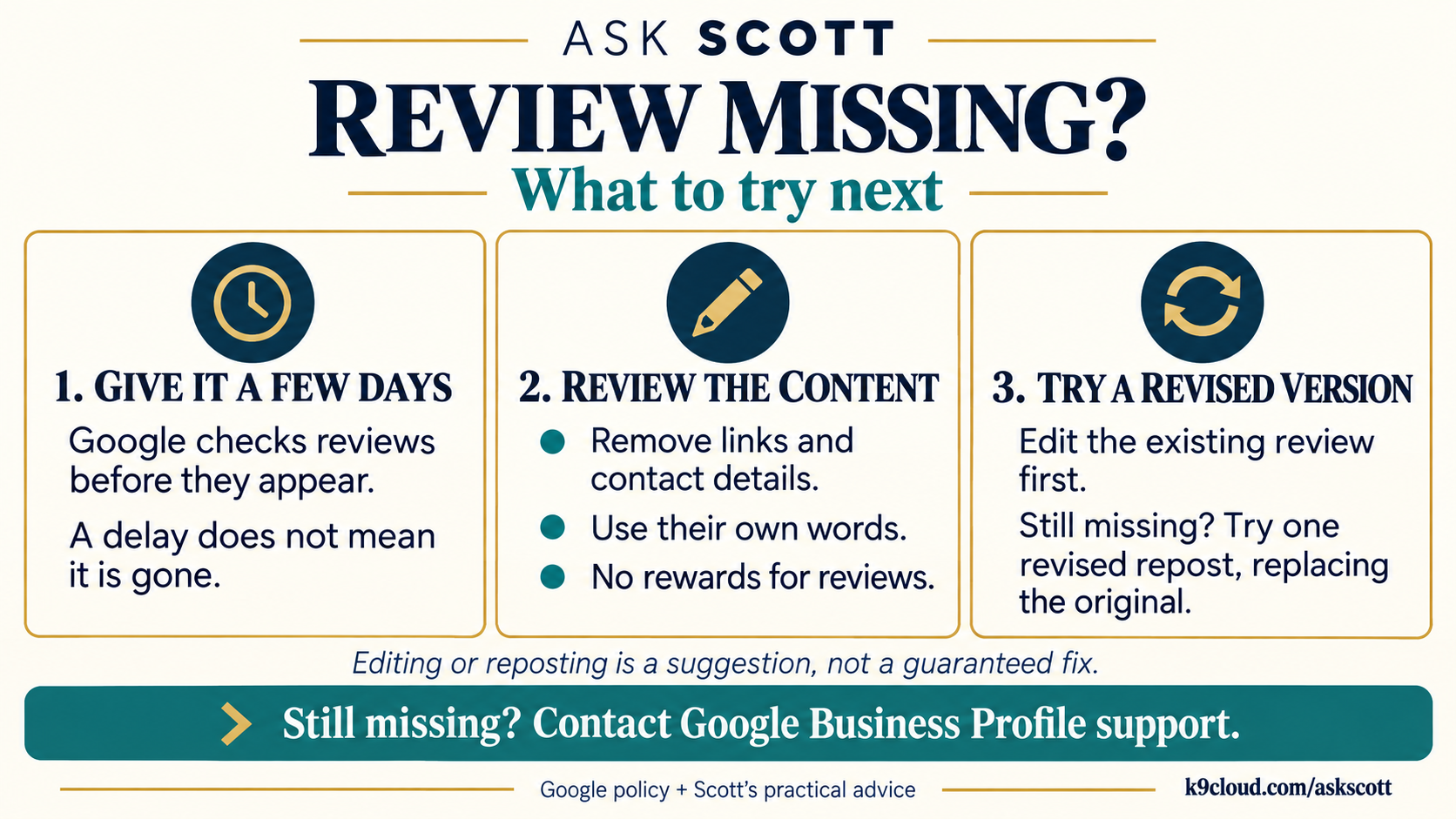
Google checks every review before it appears, and that can take a few days. So first….give it a little time (Google’s explanation). A delay doesn’t mean it’s gone.
If it still hasn’t shown up after three days, here’s what’s usually going on, and what to do about it.
The usual reasons, most common first
Brand new Google accounts. No profile photo, no real name, first review they’ve ever left. Google treats that like a throwaway account and holds the review. Completely unfair, and it’s the #1 cause by a mile.
Posted from your wifi. A client writes it standing in your lobby, another client did the same thing that week, and those two reviews look connected to Google. Same with a tablet on the counter. (Your review QR code is fine….Google recommends them. Just have people scan it and write it later, at home, on their own phone.)
Links and contact details. A phone number, a web address, an email, even “just call them at….” Google strips those.
Everybody using the same words. If several reviews read alike, the duplicates get filtered. Let people write it however it comes out. And do NOT tell them to “just have ChatGPT write it”…. those all sound the same, which is exactly what the filter is hunting for.
A burst. Six in one afternoon after a quiet month reads like a campaign. One or two a week, every week, is safer and more realistic anyway.
What is NOT a problem: naming you, naming the trainer, naming the dog, saying what they paid, being short, being long. None of that trips a filter.
The two that can cost you reviews you ALREADY have
Google’s published rules also prohibit:
- Rewards for reviews. No free session, discount, or bag of treats in exchange for a review. Even an honest one. I’ve told at least one owner that a subtle version was fine. I was wrong. If you’re doing that, stop today….businesses have lost their entire review history over a 10% off offer.
- Employees and family. Reviews from anyone connected to the business get pulled. In a two-trainer shop that list is bigger than you think.
What to tell the client
Ask them to find the review in their own Google Maps profile. On a computer: Menu → Your contributions → Reviews (Google’s instructions).
- If it’s there: it got filtered, not lost. They can edit it. Remove any links or contact details, and replace copied wording with their own account of what happened. If an edit doesn’t do it, one revised repost, replacing the original. Don’t keep resubmitting the same thing or switch accounts.
- If it isn’t there: have them check they’re signed into the account they used. If nothing’s saved, trying again a day or two later is reasonable, and it works way more often than it should.
A review can show on the client’s side and still be hidden from the public, so seeing it on your listing is the check that matters.
That’s a fix for a filtered review, not a loophole. Changing a few words doesn’t make an incentivized review OK.
If it’s still missing
We already read the review count on every listing we manage every morning, so if a batch ever disappears, it gets caught. Beyond that, you can contact Google Business Profile support with your listing link, the reviewer’s name, and the rough date. It’s slow and hit or miss….I won’t promise they come back. But the path exists.
One more check: search your own business name in Google Maps and make sure there isn’t a second, unclaimed listing. Reviews left on the twin never show up on the real one. If there’s any confusion about which listing the client reviewed, a screenshot with the business name sorts it out.
Make the NEXT review easy
Ask at the moment of the win….the day a dog graduates, right after the session where it finally clicked. Google gives you a link that drops someone straight into the review box on your listing. To grab it, search your business name on Google while you’re signed in, and in the “Your business on Google” panel click “Ask for reviews”…. copy the link it shows you.
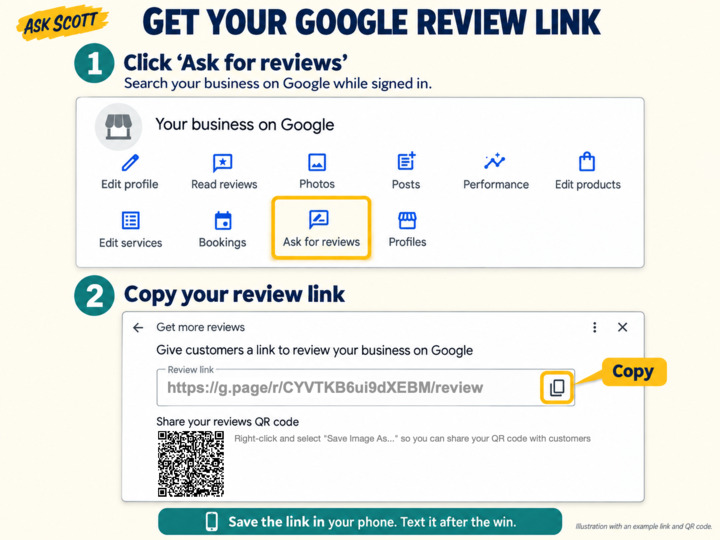
Save that link in your phone and text it the same day. Not a mass email to everybody you’ve ever trained. No reward, no script, and let them use their own words.
Your job is to make asking easy….not turn a happy client into your Google troubleshooting department.
If you like our content, please add us as a “Preferred Source” to your Google account.